SEO report builder
An SEO report builder for client-ready decks. Branded, live and done in minutes.
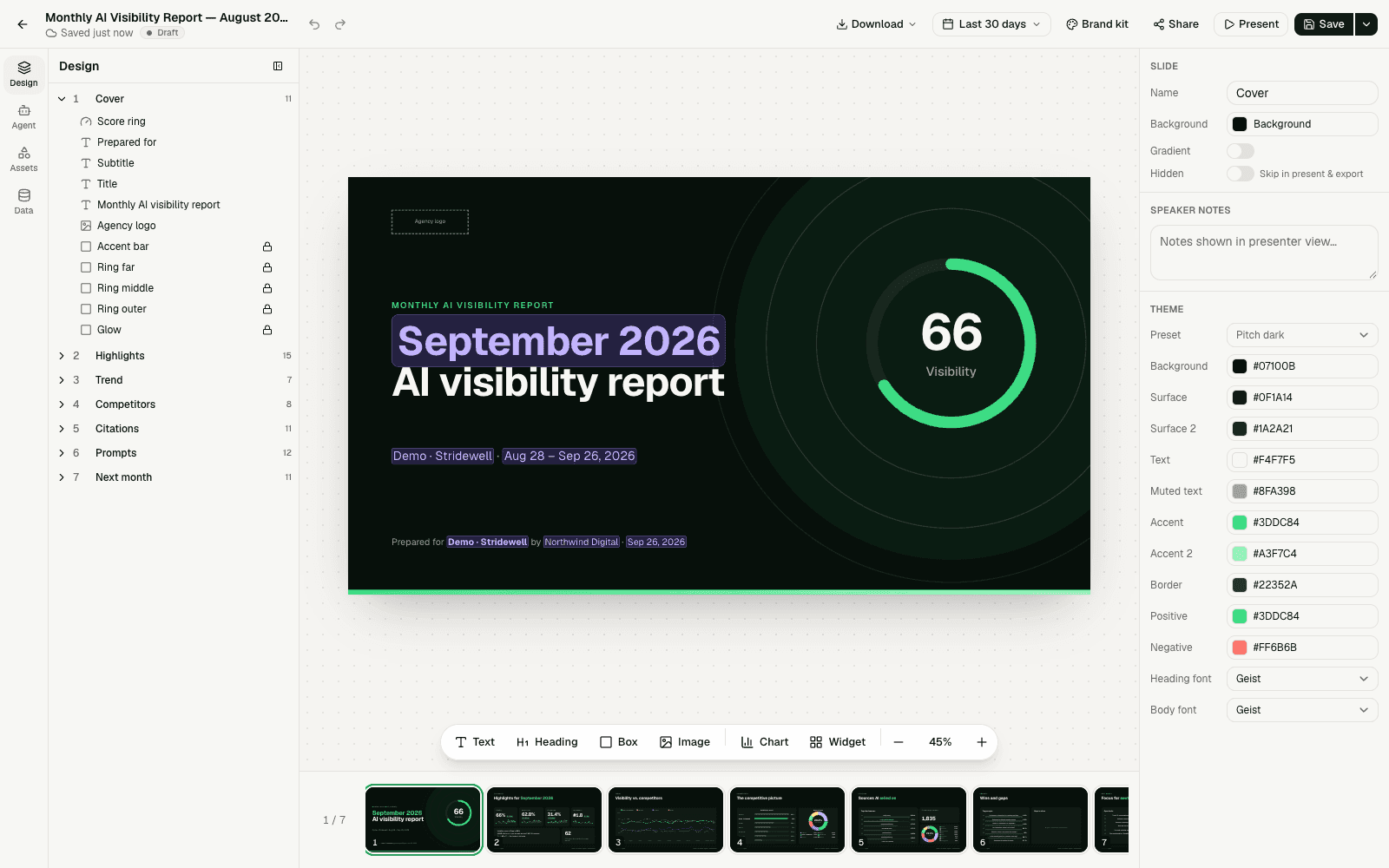
Drag live AI visibility, SEO and traffic data onto branded slides or start from one of 11 templates. Present in the browser, export to PowerPoint or PDF, or send a password-protected link — and let AI write the summary.
Why it matters
Clients want proof, not screenshots.
Agencies and in-house teams lose hours every month copying numbers from several tools into slides. When the data already lives in one place, the report can pull it in automatically and look the same from month to month.
- 01
AI visibility is new to clients
Most stakeholders have never seen how AI engines talk about their brand. A clear deck with visibility, competitors and sources makes the case.
- 02
Consistency builds trust
The same template, metrics and brand every month make changes easy to read and hard to dispute.
- 03
Time belongs to the work
Every hour spent formatting slides is an hour not spent fixing pages, earning citations or winning new clients.
- Report templates
- 11
- From pitch deck to monthly report
- Export formats
- 2
- PowerPoint (PPTX) and PDF
- Self-hosted
- $0
- MIT licensed, every feature
- Cloud per month
- $50
- Per workspace, unlimited users
What's included
Everything you need for client reporting, in one editor.
Drag and drop with live data
Place KPIs, charts, tables, lists, text and images on slides. Data fields such as visibility, citations or audit score update with the reporting period.
11 templates
Pitch, Audit Pitch, Monthly Report, Competitor Benchmark, Citation Analysis, GEO Audit, Executive One-Pager and more — or save your own.
Brand kits
Your agency's name, logo, colors and fonts, with a client logo and accent color per project on top.
PPTX, PDF and present mode
Download PowerPoint files with native charts, export PDFs, or present full screen right in the browser.
Password-protected share links
Share a report by link with an optional password and expiry date, see how often it was viewed and revoke it at any time.
AI-written reports
Let AI summarize the period, rewrite text or design a slide — or generate a complete HTML report from your data and your instructions.
How it works
From data to deck in three steps.
- 1 Step 1
Pick a template and a period
Start from one of 11 templates and choose the last 7, 30 or 90 days, month to date, last month or a custom range.
- 2 Step 2
Make it yours
Apply your brand kit, drag in metrics and charts, and add your commentary — or let AI draft the summary for you.
- 3 Step 3
Present, export or share
Present in the browser, download PPTX or PDF, or send a password-protected link that expires when you want it to.
FAQ
Frequently asked questions
What is an SEO report builder?
An SEO report builder turns your SEO data into presentations for clients or stakeholders without copying numbers by hand. AutoSEO's report builder places live AI visibility, SEO and traffic metrics on branded slides that update with the reporting period.
Can I create white-label SEO reports?
Yes. A brand kit stores your agency's name, logo, website, contact email, colors and fonts. Each project can add the client's name, logo and accent color, so every report carries your brand and your client's.
Which report templates are included?
AutoSEO includes 11 templates: Blank, Blank (Classic), Pitch, Audit Pitch, Monthly Report, Competitor Benchmark, Citation Analysis, Prompt Coverage, GEO Audit, Baseline Snapshot and Executive One-Pager. You can also save any report as your own template.
Can I export reports to PowerPoint or PDF?
Yes. Download any report as a PPTX file with text, shapes, images, tables and native charts, or as a PDF. You can also present it full screen in the browser.
How do report share links work?
Turn on sharing to get a read-only link your client can open without signing in. You can protect it with a password, set an expiry date, see the number of views and revoke the link at any time.
What data can I put in a report?
AI visibility, mention and citation rates, prompts, competitors and share of voice, sentiment, cited sources, site audit and crawlability scores, Search Console clicks and sessions from AI platforms. Values follow the reporting period you pick.
Can AI write the report for me?
Yes. AI can summarize the period, rewrite text, design single slides or generate a complete HTML report from presets such as a monthly client check-in or a GEO audit narrative. It runs on your own Claude Code or Codex through the local agent, or on the AI provider configured for your AutoSEO.
Is the report builder free?
The report builder is part of the open-source AutoSEO app and free to self-host with every feature. AutoSEO Cloud gives you a managed workspace for $50 per month with unlimited users, no per-seat fees and $10 of AI and data usage included.
Related features
Works better together. One platform, one dataset.
- AI visibility trackingTrack how often 16 AI engines mention and cite your brand, every day.
- AI competitor analysisSee which brands AI recommends instead of you, and where they win.
- AI SEO agentChat with your SEO and AI visibility data on your own Claude Code or Codex.
- Site auditCrawl your site with 29 technical SEO checks, Lighthouse scores and run comparisons.
Send your next client report in minutes
Start with an AutoSEO Cloud workspace for $50/month, or self-host the open-source edition for free.