AI SEO agent
An AI SEO agent that knows your data. Running on your own Claude Code or Codex.
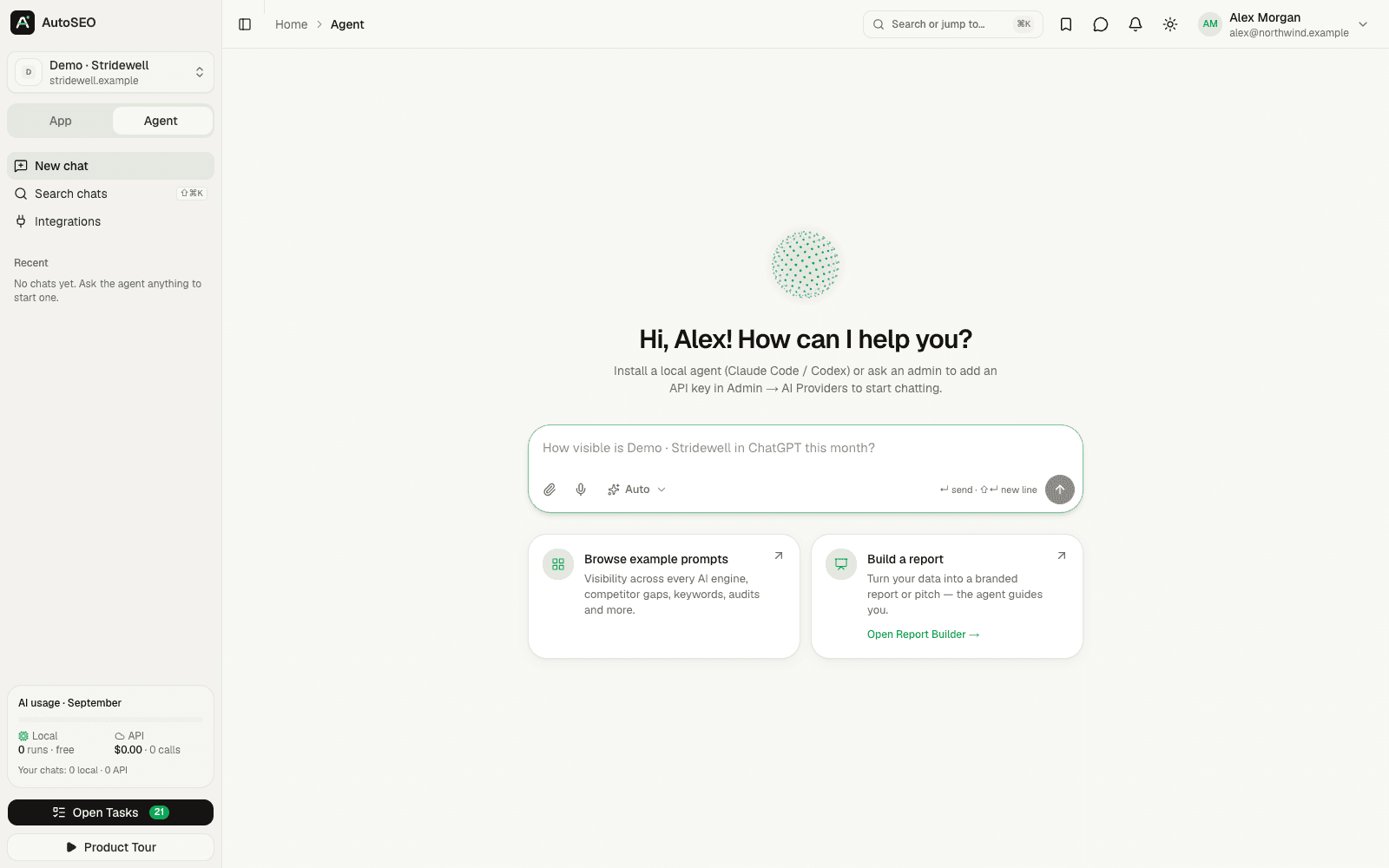
Ask questions in plain language and Agent mode answers with your real numbers — visibility, competitors, keywords, rankings, audits and traffic. It runs on the Claude Code or Codex subscription you already pay for through a local agent, with API keys as a fallback.
Why it matters
Dashboards show what happened. An agent explains why and what's next.
AutoSEO collects a lot of data: AI answers, citations, competitors, rankings, audits and traffic. Agent mode lets anyone on the team ask a question and get an answer built from that data, with every tool call visible, instead of clicking through ten reports.
- 01
Questions cross datasets
Why did visibility drop? Which prompts does a competitor win? The answer usually needs tracking, sources and rankings at once.
- 02
Your subscription, not another bill
If you already pay for Claude Code or Codex, the agent uses that subscription through a local agent. API keys are only a fallback.
- 03
Grounded in real numbers
The agent calls AutoSEO tools for every figure, so answers come from your tracked data instead of the model's memory.
- AutoSEO tools
- 100+
- Available in every chat
- Local runtimes
- 2
- Claude Code and Codex CLI
- API fallbacks
- 3
- Anthropic, OpenAI, OpenRouter
- Self-hosted
- $0
- MIT licensed, every feature
What the agent can do
An SEO analyst in a chat window, with every AutoSEO tool.
Chat with all your data
Ask about visibility, competitors, sentiment, sources, keywords, rankings, audits, Search Console and GA4 — with every tool call shown.
Runs on Claude Code or Codex
A lightweight local agent runs each chat as a fresh CLI session on your machine, connected over outbound HTTPS only — no open ports.
API fallback
No local agent online? Chats fall back to an Anthropic, OpenAI or OpenRouter model configured for your AutoSEO.
Reports and briefs on request
Ask for a monthly report, a content brief or a pitch outline, and the agent builds it from your data and saves it in AutoSEO.
Files and voice input
Attach up to six images, PDFs, CSVs or text files per message, or dictate your question instead of typing it.
Scoped and permission-aware
Each chat gets a short-lived token restricted to the active project, and your role decides which tools can run or spend money.
How it works
From question to answer in three steps.
- 1 Step 1
Install the local agent
Open Settings → Local Agents, copy the one-line installer for macOS, Linux or Windows and run it on a machine with Claude Code or Codex.
- 2 Step 2
Pick a project and ask
Start from an example question or type your own. The agent calls AutoSEO tools and shows each step as it works.
- 3 Step 3
Act on the answer
Turn findings into reports and content briefs, or keep the conversation going. Chats are saved per project and searchable.
FAQ
Frequently asked questions
What is an AI SEO agent?
An AI SEO agent is an AI assistant that can look up SEO data itself and act on it, instead of only answering from its training. AutoSEO's Agent mode connects Claude Code, Codex or an API model to every AutoSEO tool, so it can analyze your AI visibility, rankings, audits and traffic and build reports from them.
Do I need an API key to use Agent mode?
No. Agent mode can run on your own Claude Code or Codex CLI through AutoSEO's local agent — in AutoSEO Cloud too — so it uses the subscription you already have. Without a local agent, it falls back to an AI provider API: on AutoSEO Cloud it uses the providers the Codext team has connected, with usage counting toward the $10 included each month, and when you self-host you add Anthropic, OpenAI or OpenRouter keys.
How does the local agent work?
The local agent is a small Node.js program you install with one command on macOS, Linux or Windows. It connects to AutoSEO over outbound HTTPS only, runs every job in a fresh CLI session in its own folder, and updates itself from signed releases.
Is it safe to run the agent on my machine?
The agent opens no ports and its token is stored on the server only as a hash. By default it runs the CLI in lean mode, without your personal settings, MCP servers or shell. Full mode, with your own MCP servers, only runs for jobs you started and only if you allowed it locally.
Can teammates use my Claude Code subscription?
Not for chats. Agent mode conversations only run on the local agent of the person who asks. Each teammate connects their own Claude Code or Codex, or uses the API fallback.
Which data can the agent access?
The agent works inside the active project and uses the same permissions as you. It can read AI visibility, competitors, sources, keywords, rankings, audits, Search Console and GA4 data, and it can only run paid tools if your role allows it.
Can I use AutoSEO from my own Claude Code or Cursor instead?
Yes. Besides the built-in Agent mode, AutoSEO has an MCP server with 100+ tools and plugins for Claude Code, Codex and Cursor. Connect your agent to AutoSEO and work with the same data from your editor or terminal.
What does Agent mode cost?
Agent mode is part of the free, open-source AutoSEO app. On a local agent it uses your existing Claude Code or Codex subscription. API fallback usage is billed by the provider when you self-host, or counts toward the $10 of AI and data usage included in an AutoSEO Cloud workspace for $50 per month.
Related features
Works better together. One platform, one dataset.
- MCP serverConnect Claude, ChatGPT, Cursor or Codex to your data with 100+ MCP tools.
- Report builderBranded client reports with live data, 11 templates, PPTX/PDF export and share links.
- AI visibility trackingTrack how often 16 AI engines mention and cite your brand, every day.
- AI SEO tasksEvidence-backed GEO and SEO tasks, prioritized and pushed to Jira, Linear or Asana.
Ask your SEO data anything
Start with an AutoSEO Cloud workspace for $50/month and connect your own Claude Code or Codex, or self-host the open-source edition for free.