AI SEO tasks
Turn AI SEO data into tasks your team can finish.
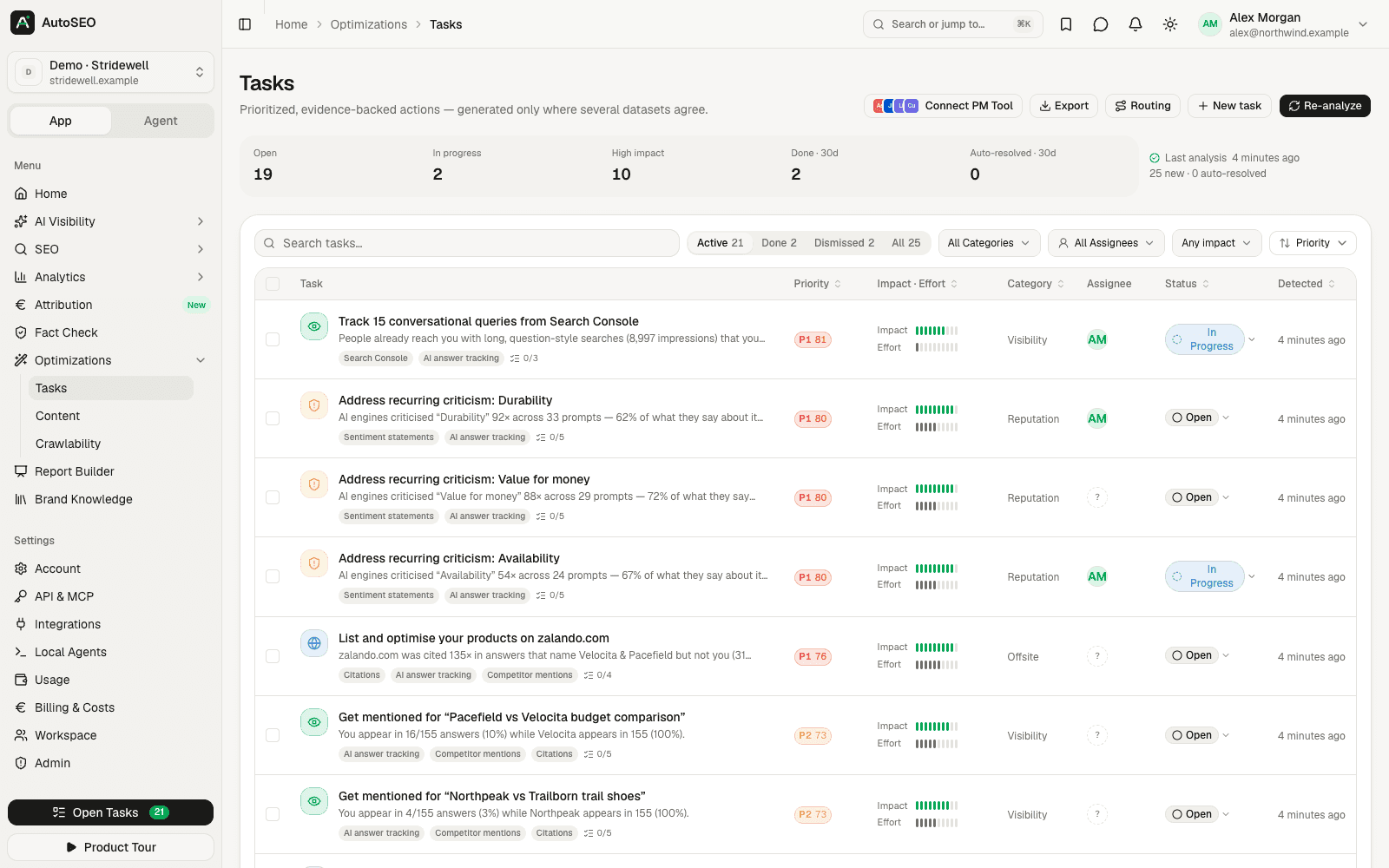
Every day, AutoSEO analyzes your prompt visibility, citations, competitors, sentiment, crawl access and Search Console data and turns what it finds into prioritized tasks — with evidence, steps and acceptance criteria attached. Push them to Jira, Linear, Asana and five more tools. When the signal disappears, the task resolves itself.
Why it matters
Dashboards don't fix anything. Assigned tasks do.
AI visibility data raises more questions than it answers: which prompt to work on, which page to write, which forum to show up in. Without a clear list of next steps, insights stay in reports while competitors act.
- 01
Too many signals, too little time
Visibility gaps, citation gaps, crawl errors and criticism all compete for attention. One priority score based on impact and effort puts them in order.
- 02
Every task needs a reason
A task backed by the prompts, answers and URLs that triggered it is easier to approve — and easier to check once it's done.
- 03
Work happens in your PM tool
Developers live in Jira, content teams in Asana or Notion. Tasks should arrive where their owners already work.
- Signal sources
- 8
- Visibility to Search Console
- Task categories
- 7
- Technical to reputation
- Task destinations
- 9
- 8 PM tools plus webhooks
- Self-hosted
- $0
- MIT licensed, every feature
What you get
An action plan that updates itself, every day.
Seven task categories
Technical, content, visibility, competitor, offsite, reputation and setup — each with a suggested owner, from the web team to PR.
Priority from impact and effort
Each task gets impact and effort scores from 1 to 10, a priority from 10 to 100 and a band from P1 to P4, so quick wins rise to the top.
Evidence attached
The prompts, answers, cited URLs, audit results or Search Console rows behind each task, plus steps and acceptance criteria.
A list that maintains itself
Re-analyzed daily and after every tracking run. Tasks resolve themselves when their signal disappears and reopen if it comes back.
Push to your PM tool
Linear, Jira Cloud, Asana, ClickUp, Trello, monday.com, Notion and awork with status synced back — or signed webhooks for Zapier, n8n and Make.
Routing by category
Give each category a default assignee and a target tool, and new tasks are assigned and pushed automatically.
How it works
From data to done in three steps.
- 1 Step 1
AutoSEO analyzes your data
Eight signal sources check visibility, citations, competitors, reputation, content coverage, technical health, Search Console and your tracking setup.
- 2 Step 2
Tasks are written and ranked
When an AI provider is available, AI writes each task from its evidence; otherwise clear templates are used. Duplicates are merged automatically.
- 3 Step 3
Your team works through them
Assign tasks, push them to Jira or Linear, draft content straight from a task's content plan, or export the list as CSV.
FAQ
Frequently asked questions
How does AutoSEO generate SEO tasks?
AutoSEO runs eight signal sources over your project data: AI visibility, citations, competitors, reputation, content coverage, technical health, Search Console and tracking setup. Each finding becomes a task with evidence, steps and acceptance criteria. The analysis runs daily and again after every tracking run.
What kinds of tasks does it create?
Examples include getting mentioned for a prompt where competitors appear, publishing a page that answers an uncovered question, winning head-to-head comparisons, getting listed on a site AI cites for competitors, addressing recurring criticism, correcting inaccurate AI claims and unblocking pages that refuse crawlers.
How are tasks prioritized?
Every task has an impact and an effort score from 1 to 10. The priority is 10 × (0.65 × impact + 0.35 × (11 − effort)), so high impact dominates and cheaper tasks win ties. Priorities of 75 and above are P1, 60 and above P2, 45 and above P3, the rest P4.
Can I push tasks to Jira or Linear?
Yes. Connect Jira Cloud, Linear, Asana, ClickUp, Trello, monday.com, Notion or awork with an API token and pick the project, team or list. Status syncs back, so a task closed in your PM tool is closed in AutoSEO. A signed webhook sends events to Zapier, n8n, Make or your own endpoint.
Do tasks update automatically?
Yes. Tasks are deduplicated by fingerprint, their evidence is refreshed on every analysis, and a task whose signal has disappeared resolves itself. If the problem comes back, the task reopens. You can switch auto-resolve off per project.
Do I need an AI provider for tasks?
No. Tasks are found in your data without AI and written from templates. When AI is available — through the providers the Codext team has connected on AutoSEO Cloud, your own Claude Code or Codex through a local agent, or your own API keys when self-hosting — it writes the title, summary and steps from the evidence.
Are AI SEO tasks free?
Tasks are part of the open-source AutoSEO app and free to self-host with every feature. AutoSEO Cloud gives you a managed workspace for $50 per month with up to 10 projects and $10 of AI and data usage included. There are no per-task or per-seat fees.
Related features
Works better together. One platform, one dataset.
- AI content optimizationResearch, draft and score content that AI engines can quote, then publish it to your CMS.
- AI crawlability checkCheck whether AI crawlers can reach and read your site, with fixes you can paste in.
- AI citation trackingSee which pages AI engines cite for your prompts, and where you need to be listed.
- AI competitor analysisSee which brands AI recommends instead of you, and where they win.
Get a prioritized action plan for AI search
Start with an AutoSEO Cloud workspace for $50/month, or self-host the open-source edition for free.