Keyword research tool
Keyword research in 143 markets, right next to your AI visibility data.
Enter a seed keyword and AutoSEO pulls related keywords, suggestions and ideas from DataForSEO — with search volume, CPC, competition, keyword difficulty, intent and a 12-month trend. Save the best ones to tagged lists, check the SERP and export to CSV or Google Sheets.
Why it matters
Keywords still map the demand. AI answers start from the same questions.
Search volume shows what people look for, difficulty shows what it takes to rank, and intent shows what they want to do next. Classic search and AI assistants answer the same questions, so keyword data remains the clearest map of what your audience wants to know.
- 01
Volume without intent is noise
A high-volume keyword is worthless if the searcher wants something you don't offer. Intent labels help you keep the terms that fit your pages.
- 02
Difficulty sets the timeline
Keyword difficulty and competition show which terms you can win soon and which need stronger pages, links and time.
- 03
Research only pays off when it's kept
Saved lists with tags turn one-off searches into a keyword plan your team can refresh, filter and build content on.
- Markets
- 143
- Country and language per search
- Keywords per search
- 500
- 150, 300 or 500 results
- Keyword sources
- 3
- Related, suggestions and ideas
- Self-hosted
- $0
- MIT licensed, every feature
What you get
Everything you need to pick keywords, in one place.
Related keywords, suggestions and ideas
Three DataForSEO sources, or Auto mode that tries them in turn until it finds enough real alternatives to your seed keyword.
Volume, CPC, difficulty and intent
Every keyword comes with search volume, CPC, competition, a 0–100 difficulty score and search intent, plus the 12-month search trend.
SERP analysis
Open the Google results for any keyword — top 20 or top 100 — to see which domains rank and what kind of page wins.
Filters that cut the list down
Include or exclude terms and set ranges for volume, CPC and difficulty until only the keywords that fit are left.
Saved lists with tags
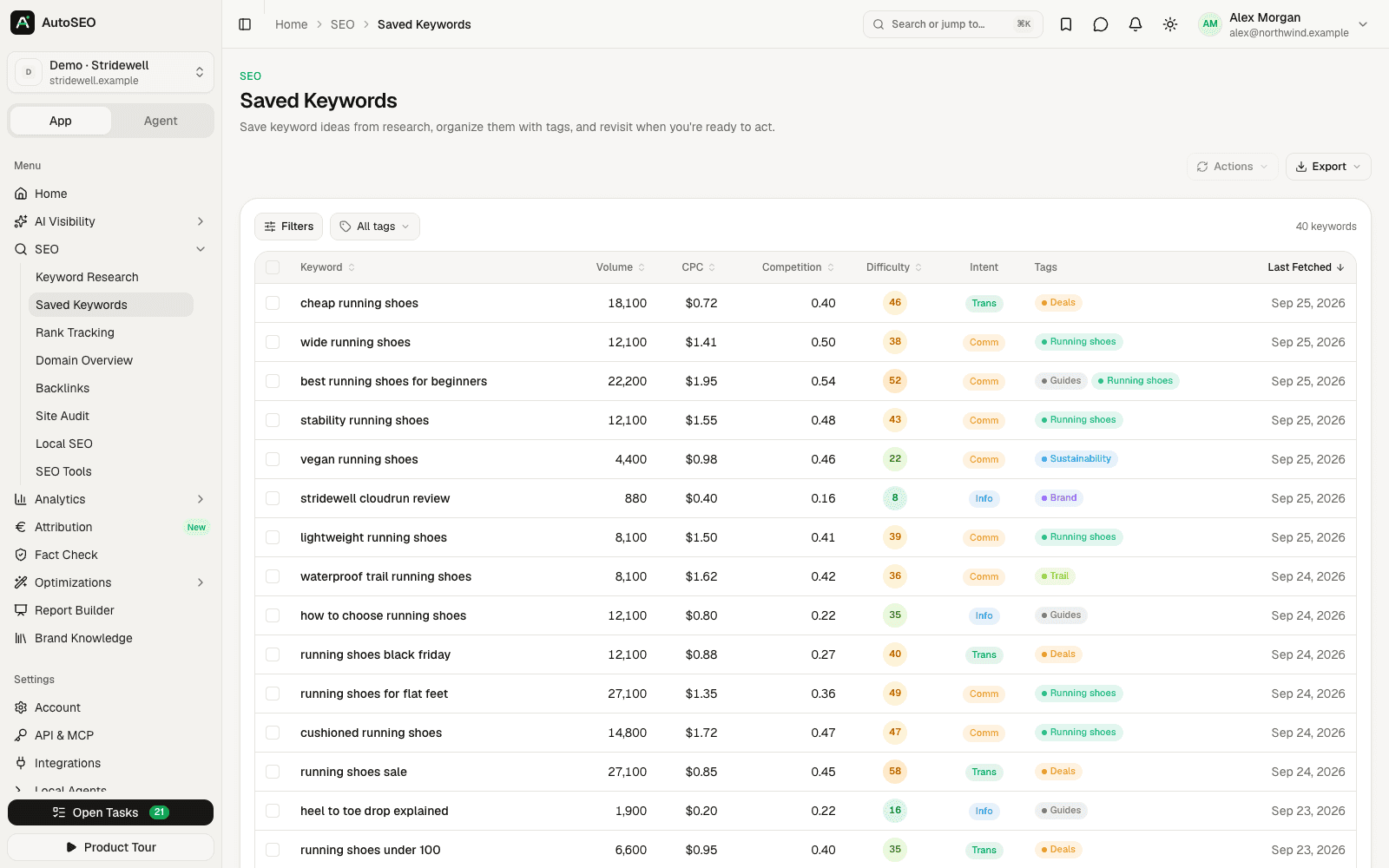
Save keywords to your project, organize them with colored tags, filter by tag and refresh their metrics whenever you need current numbers.
Export to CSV and Google Sheets
Send results or saved lists straight into a new Google Sheet in your linked account, or download them as CSV.
How it works
From seed keyword to keyword plan in three steps.
- 1 Step 1
Enter a seed keyword
Pick the market and language, the number of results and the keyword source. AutoSEO shows the estimated cost before you search.
- 2 Step 2
Filter, sort and check the SERP
Sort by volume or difficulty, narrow the list with term and range filters, and open the search results for any keyword.
- 3 Step 3
Save, tag and export
Save the keywords you want to target to tagged lists, refresh their metrics later and export them to CSV or Google Sheets.
FAQ
Frequently asked questions
What is a keyword research tool?
A keyword research tool shows how often people search for a term, how hard it is to rank for it and what the searcher wants. AutoSEO adds related keywords, suggestions and ideas for any seed keyword, with volume, CPC, difficulty and intent in 143 markets.
Where does the keyword data come from?
Keyword data comes from DataForSEO Labs, with Google Ads keyword data for markets that Labs doesn't cover. On AutoSEO Cloud, data features run through the providers the Codext team has connected, and usage counts toward the $10 included each month; when you self-host, you connect your own DataForSEO account. Results are cached for 24 hours, so repeating a search doesn't cost again.
How is keyword difficulty calculated?
Keyword difficulty is DataForSEO's organic ranking difficulty on a scale from 0 to 100 — the higher the score, the harder it is to reach Google's top 10. Competition is a separate 0–1 value that shows how many advertisers bid on the keyword in Google Ads.
Can I export keywords to Google Sheets?
Yes. With a linked Google account, AutoSEO creates a new spreadsheet through the Google Sheets API. Without one, it copies the table to your clipboard and opens a blank sheet to paste into. CSV export is always available.
Can I save and organize keywords?
Yes. Save keywords from any search to your project, group them with colored tags and filter the list by tag. You can refresh the metrics of saved keywords at any time to get current volumes and difficulty.
Does keyword research work outside the US?
Yes. You choose the country and language for each search from 143 markets. Volumes and difficulty are specific to that market, so you can compare demand across the countries you sell in.
Can AI agents do keyword research in AutoSEO?
Yes. Agent mode and the MCP server include tools to research keywords, check SERPs and save keywords with tags. The keyword-research and keyword-clustering agent skills guide Claude Code, Codex or Cursor through the whole workflow.
Is the keyword research tool free?
The keyword research tool is part of the open-source AutoSEO app and free to self-host; keyword data is then billed by DataForSEO per request, and AutoSEO shows the estimated cost before each search. AutoSEO Cloud gives you a managed workspace for $50 per month with $10 of AI and data usage included.
Related features
Works better together. One platform, one dataset.
- Rank trackingTrack Google positions on desktop and mobile, by country or city, on your schedule.
- Site auditCrawl your site with 29 technical SEO checks, Lighthouse scores and run comparisons.
- Prompt researchFind the questions buyers ask AI assistants and turn them into tracked prompts.
- AI SEO agentChat with your SEO and AI visibility data on your own Claude Code or Codex.
Find the keywords worth writing for
Start with an AutoSEO Cloud workspace for $50/month, or self-host the open-source edition for free.